


Encrypted in your browser
AES-256-GCM with a key derived from your vault passphrase via scrypt. The plaintext never leaves your device — not to the server, not to a CDN, not to logs.
Starting…
Client-side encrypted — zero-knowledge by design
StealthLedger is a portfolio tracker that never sees your portfolio. Your holdings are sealed with AES-256-GCM in your browser; the server stores an opaque blob it has no key to open.
Signups need a one-time code from someone who already has one.
AES-256-GCM with a key derived from your vault passphrase via scrypt. The plaintext never leaves your device — not to the server, not to a CDN, not to logs.
Face ID, Touch ID, Windows Hello, or a hardware key. WebAuthn PRF becomes your login secret — nothing to type, nothing to phish, nothing for an attacker to grind against.
Every write is bound to a monotonic sequence and authenticated with the same key that decrypts it. Rollback and cross-vault splice attacks both fail the same authentication check.
A stolen database gives an attacker no shortcut. The server holds a scrypt verifier and ciphertext; the key that unlocks either only ever lives in your device's memory.
Bring your Koinly holdings in as a live section — read-only, on your device, cached against your API key. Or don't; the app works entirely with hand-entered holdings if you'd rather nothing third-party ever sees your ledger.
Track crypto and cash in one view, priced in your base currency (AUD, USD, whatever). Bank balances live next to XMR bags; the grand total is one number.
See it in action
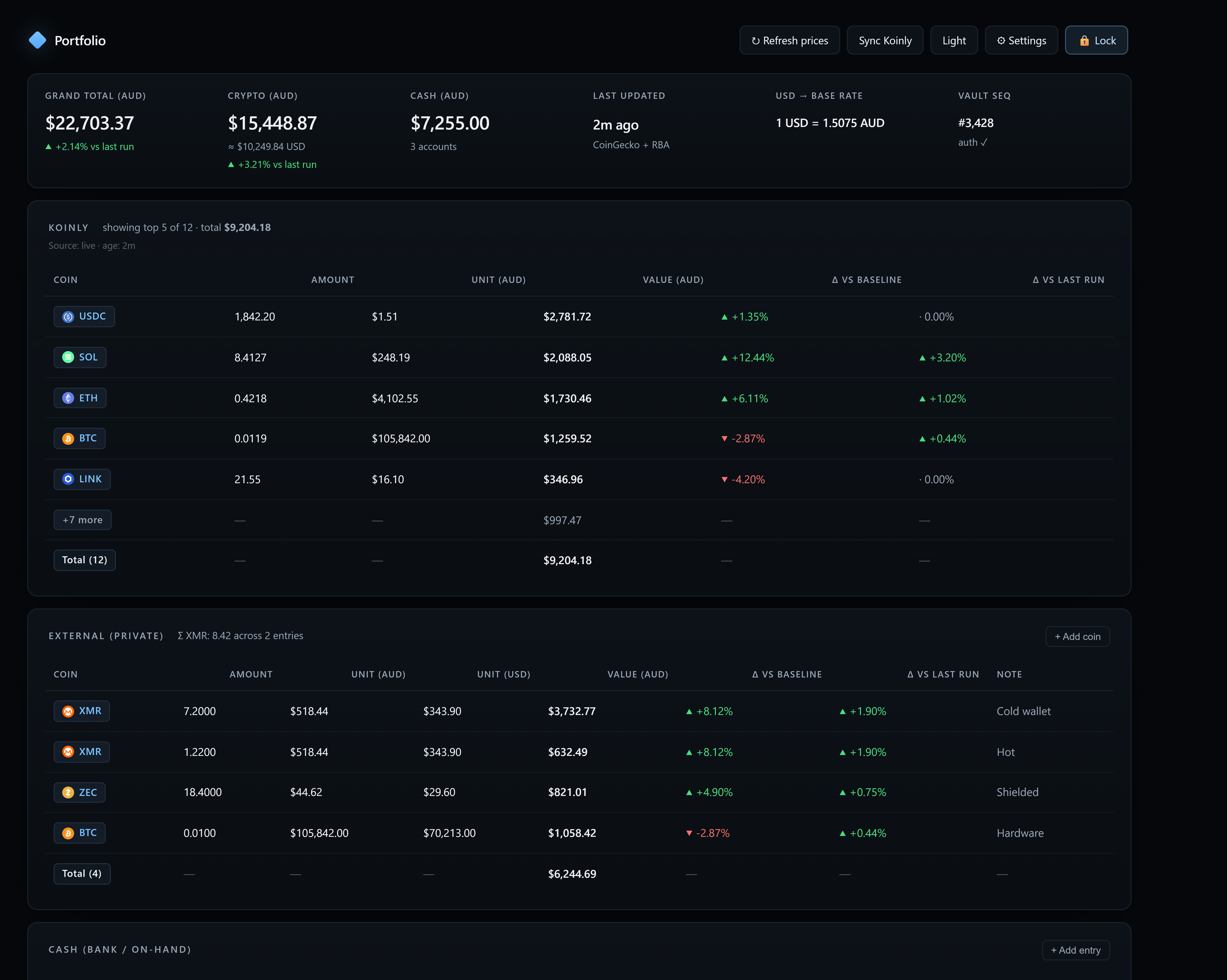
This is the actual app after unlock. Every number below was rendered client-side from a locally decrypted vault. The server watched ciphertext go by.
How it works
You pick a login (passkey or passphrase) and a separate vault passphrase. The vault passphrase is the only key that decrypts your holdings — it is derived locally with scrypt and never transmitted.
Add positions, prices, and notes in a private spreadsheet. Every keystroke is encrypted in your browser before it syncs to storage under a monotonic sequence number.
Sign in from another device, present your login credential, unlock with your vault passphrase, and the browser decrypts locally. Lose both the device and the passphrase and the ciphertext stays sealed forever.
Under the hood
Standard primitives, boringly configured. Nothing custom, nothing clever — the encryption layer and threat model are open and published for review.
FAQ
Yes, at the level we can prove in the browser. Your holdings are encrypted on your device with AES-256-GCM before they ever leave. The server sees only a blob of ciphertext plus a monotonic sequence number. The key never touches the network.
Default to passkey. Your device (Face ID, Touch ID, Windows Hello, a hardware key) holds a private key that never leaves it; on login the browser asks the device for a per-site secret and we stretch that with the same scrypt KDF the passphrase path uses. Nothing to remember, nothing to phish.
Pick passphrase if you'd rather memorise a phrase, or if you plan to log in from browsers where passkey roaming is awkward.
Either way, your vault passphrase — the one that actually decrypts your holdings — is separate and still typed. That's the key the server can never see, and it's what makes the encryption real.
If your passkey syncs (iCloud Keychain, Google Password Manager, 1Password, etc.) it comes back with your account. If it doesn't — say it lived only on one hardware key — the account is stuck. StealthLedger can't reset it because it has no shared secret to reset to.
Practical mitigations, in order of effort:
The server never stores your login secret. It stores a scrypt verifier with N=65536, r=8, p=1 — about 64 MB of memory per guess. A stolen database gives an attacker no help decrypting any vault; vault contents need the vault passphrase, which the server has never seen.
Your holdings are gone. Not "wait a while" gone — gone. There is no reset flow because there is no reset key. Set up a recovery code when you create the vault; that's the escape hatch.
Because the site serves you the JavaScript that touches your vault passphrase, a determined operator could push a poisoned build. We mitigate that with a strict Content-Security-Policy (no inline scripts, no third-party origins), a small hand-written codebase, and a published crypto spec you can diff against what your browser loads. The application code itself is proprietary; the encryption layer, threat model, and audit-log format are open for review.
None. No trackers, no pings, no third-party scripts.
Signups are invite-only right now. If a friend already has an account, ask them to mint you a one-time invite from their admin panel — the link pre-fills the code so you're two minutes and one passkey prompt away.
Paste the access token for your vault. This only lets the device reach the encrypted file — it can't decrypt anything on its own.
It's the VAULT_ACCESS_TOKEN you set in your Netlify
environment variables. Opening the install link from your desktop
(#t=…) fills this in automatically and then wipes it from
the address bar.
Your encrypted holdings, on a server that can't read them.
New here? Create an account · How does this work?
One credential to log in — a passkey or a passphrase, your call. The vault passphrase opens the file in your browser and never leaves it.
Already have an account? Log in · How does this work?
Yes, at the level we can prove in the browser. Your holdings are encrypted on your device with AES-256-GCM before they ever leave. The server sees only a blob of ciphertext plus a monotonic sequence number. The key never touches the network.
Default to passkey. Your device (Face ID, Touch ID, Windows Hello, a hardware key) holds a private key that never leaves it; on login, the browser asks the device for a per-site secret and we stretch that with the same scrypt KDF the passphrase path uses. Nothing to remember, nothing to phish.
Pick passphrase if you'd rather memorise a phrase, or if you plan to log in from browsers where passkey roaming is awkward. You can't switch after signup yet — that's coming.
Either way, your vault passphrase — the one that actually decrypts your holdings — is separate and still typed. That's the key the server can never see, and it's what makes the encryption real.
If your passkey syncs (iCloud Keychain, Google Password Manager, 1Password, etc.) it comes back with your account. If it doesn't — say it lived only on one hardware key — the account is stuck. StealthLedger can't reset it because it has no shared secret to reset to.
Practical mitigations, in order of effort:
The server never stores your login secret — passphrase or passkey. It stores a scrypt verifier with N=65536, r=8, p=1 (about 64 MB per guess). A stolen database gives an attacker no help decrypting any vault — vault contents need the vault passphrase, which the server has never seen.
Passkey accounts are quietly stronger against dumps because the secret going into scrypt is a 32-byte high-entropy value from the authenticator, not something a human typed — offline cracking has essentially nothing to guess against.
Your holdings are gone. Not “wait a while” gone — gone. There is no reset flow because there is no reset key. Set up a recovery code when you create the vault; that’s the escape hatch.
Right now, the account is stuck. If we later add an email-based reset it will only reset the login, not decrypt anything — the vault contents are still gated by the vault passphrase.
Because the site serves you the JavaScript that touches your vault passphrase, a determined operator could push a poisoned build. We mitigate that with a strict Content-Security-Policy (no inline scripts, no third-party origins), a small hand-written codebase, and a published crypto spec you can diff against what your browser loads. The application itself is proprietary; the encryption layer, threat model, and audit-log format are open for review.
Same idea, narrower scope. Purpose-built encrypted spreadsheet for crypto holdings. Fewer features, smaller codebase. Bitwarden and 1Password are fully open source; StealthLedger publishes its crypto layer and threat model rather than the whole app.
None. No trackers, no pings, no third-party scripts.
Runs on donations. No accounts sold, no ads, no data ever.
XMR_ADDRESS_TBD
BTC_ADDRESS_TBD
Replace these placeholders in index.html with your real
addresses before going live.
Paste your operator token. Stored in this tab only.
Loading…
Runtime toggle. “Use env default” clears the override and falls back to the SIGNUP_MODE env var.
Loading…
Loading…
Signed in as . The passphrase below encrypts your holdings on this device — your password manager can save it against this account.
Everything is encrypted on this device before it's uploaded. Nobody operating the server can read it — including us. That also means a lost passphrase and lost recovery code is unrecoverable.
Your recovery code. It's the only way back in if you forget the passphrase and lose your passkey. It is shown once and never stored anywhere in readable form.
Your data is decrypted locally. Nothing on our servers can read it without your passphrase or passkey.
Signed in as
or
Deriving key…
—
The app code on the server has changed since this device pinned it. Nothing new runs until you accept it.
A short hash of the app files this device has pinned. If it changes unexpectedly, nothing new runs until you accept the update — so a silent replacement of the code between logins is visible here.
The value is computed and shown by the app itself, which means it detects unexpected changes rather than proving any single load was safe.
No private coins yet.
Total —
Read-only here. To refresh, open Settings → Koinly import and click
your bookmarklet from an app.koinly.io tab. Your Koinly
cookies never leave that tab.
Total —
No cash entries yet.
Total —